Facemoji AI Emoji Keyboard
NexileapPersonalization
4.778.26K Reviews
- Version
- 3.7.0
- Installs
- 100.00M
- Age Rating
- Teen
Screenshots

Our Review of Facemoji AI Emoji Keyboard
 Analysis by Appyee
I tend to notice a keyboard most when it slows me down or gets in the way. Facemoji is appealing because it puts expressive extras close at hand, but a keyboard also has to work during ordinary, hurried typing. I’d treat it as a personalization app first: a way to change the look and feel of chats, with emoji suggestions and creative tools as useful additions rather than a reason to expect every message to become effortless.
What to expect when you start typing
The first thing I’d test is the basic typing experience, not the theme gallery. A keyboard can look lively and still feel inconvenient if its keys, suggestions, or emoji controls interrupt a familiar rhythm. Facemoji’s appeal is its mix of everyday text entry and expressive options, so I’d spend a few minutes typing a normal message before settling on a design. That makes it easier to tell whether the visual style helps or distracts.
Its emoji suggestions are most useful when I already know what I want to say and just want a quick visual accent. If I type a sentence about being excited, for example, a matching emoji suggestion can save a trip through the emoji picker. I wouldn’t rely on suggestions to understand tone perfectly, though. Sarcasm, work messages, and short replies can be easy to misread, so I’d still choose the final emoji myself when the nuance matters.
Busy chats and heavier use
In a fast group conversation, the main advantage of a custom keyboard is keeping expressive choices nearby. I can imagine using it to add a sticker or an emoji combination to a friend’s birthday thread, then switching back to plain text for a practical question. That small change of pace is where personalization feels enjoyable rather than burdensome. For messages that need to be clear at a glance, I’d keep the decoration restrained.
A useful habit is to decide on a go-to theme and a few familiar ways to express yourself before a busy day, rather than exploring every option while someone is waiting for a reply. Large collections invite browsing, and browsing can turn a quick response into a detour. I’d explore when I have time, then use a smaller set of favorites in active chats. That workflow preserves the fun without making the keyboard feel like another app to manage.
Reliability in everyday conversations
For me, a keyboard earns trust through repetition: it should be comfortable for a routine message, a search query, and a longer note, not just a playful chat. I’d use Facemoji for a while before making it my default, paying attention to whether I can switch between its expressive tools and ordinary typing without losing my place. If a keyboard feels inconsistent on a particular device or in a particular app, returning to the phone’s built-in keyboard is a sensible fallback.
Customization also has a practical trade-off. A theme that looks great in a preview may be less comfortable to read or use during bright daylight, or when I’m typing quickly with one hand. I’d prioritize legible keys and a layout I can recognize over a design that looks striking in a screenshot. If the visual changes make common controls harder to spot, the extra personality is not worth the friction.
Device fit and a sensible test
Facemoji is for Android and iOS users, but that does not mean the experience will feel identical on every phone. Screen size, the operating system, and the way I type all affect whether a keyboard feels roomy or cramped. Android users should also check the minimum system requirement before installing: it needs Android 6.0 or later. On a smaller screen, I’d be especially selective about themes and add-ons that compete for space.
I’d test it in a low-stakes chat first, then in a longer message and a conversation where I often use emoji. That gives a more honest sense of how it fits into my day than judging it from a theme preview. If typing remains comfortable, I can keep exploring. If I find myself reaching for the standard keyboard whenever I need to write quickly, that is useful evidence that a simpler option suits me better.
Hey there, emoji enthusiasts! If you're like me and love to express yourself with a colorful splash of emojis, you're going to want to check out the Facemoji AI Emoji Keyboard. This app is like having a friend who knows exactly what you want to say, but in emoji form. Let's dive into what makes this app a must-have for all you emoji aficionados out there.
Getting to Know Facemoji AI Emoji Keyboard
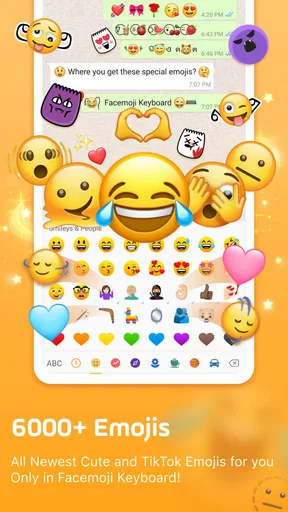
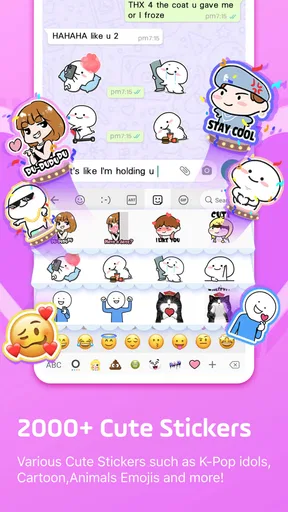
First off, let's talk about the sheer variety this app offers. The Facemoji AI Emoji Keyboard isn't just about your standard smileys and thumbs up. Oh no, it's a whole new world of customization. We're talking thousands of emojis, stickers, and themes that will make your conversations pop like a confetti cannon at a birthday party.
Installation and Setup
Installing the app is a breeze. Head over to the App Store or Google Play, download, and let the magic begin. The setup is straightforward, guiding you step-by-step through enabling the keyboard and setting it as your default. Before you know it, you're off and running, ready to sprinkle some emoji joy into your texts.
Facemoji is a free personalization app from Nexileap. Its current version is 3.6.2.1, and the app is rated Teen. It has a 4.7 average from around 1.5 million ratings, with over 100 million installs. That popularity makes it easy to see why it comes up in conversations about expressive keyboards, but it doesn’t guarantee that its style will suit everyone. I’d think of it as a way to personalize typing, not a replacement for every tool on my phone.
The app is free to install, with optional in-app purchases ranging from $0.49 to $29.99 per item. I’d start with the free experience and only consider paying if I find a particular customization worth keeping. If I mainly want fast, plain typing, a phone’s built-in keyboard may already do the job without another collection to explore.
Features That Shine
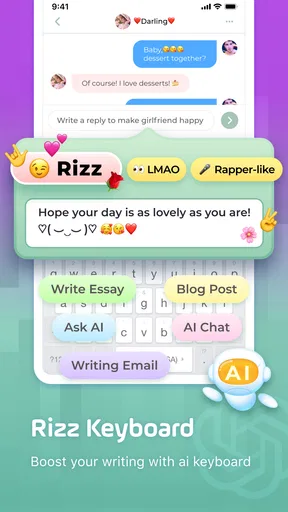
Now, let's get into the nitty-gritty of what makes this app stand out. One of my favorite features is the AI-powered emoji prediction. It's like having a mind-reader built into your keyboard. Start typing, and boom! The app suggests the perfect emoji to match your words. It's smart, intuitive, and saves so much time scrolling through endless options.
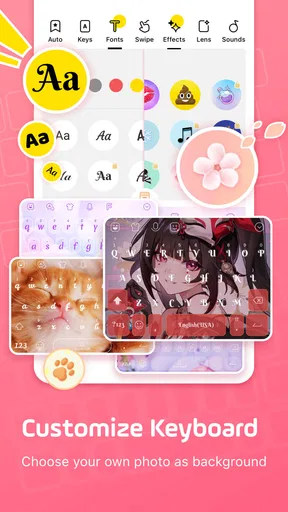
Another feature worth highlighting is the customization. You can create your own emoji combinations and even design your own keyboard themes. Whether you're into neon colors or pastel shades, the possibilities are endless. It's a great way to let your personality shine through every message.
The practical distinction I’d keep in mind is that suggestions work best as prompts, not automatic decisions. A suggested emoji can be a shortcut when I’m chatting casually, but I would check the wording and recipient before sending anything that could come across differently than I intend. For a quick “thanks” to a friend, a playful choice may fit; for a message to a coworker or a customer, plain text can be clearer.
Ease of Use
One thing I really appreciate about the Facemoji AI Emoji Keyboard is how user-friendly it is. Navigating through the emojis and settings is smooth and intuitive. Even if you're not the most tech-savvy person, you'll have no trouble getting the hang of it.
For someone deciding between Facemoji and a standard keyboard, I’d frame the choice around priorities. The built-in option is usually the straightforward pick when I value familiarity and minimal setup. Facemoji makes more sense when I actually want to browse visual styles, use stickers, or tailor the keyboard to my chats. A different lightweight keyboard may be preferable if I want fewer decorative choices and a more restrained interface.
The Social Factor
Sharing is caring, and this app knows it. You can easily share your custom emojis and themes with friends, which adds a fun, social element. It's great for group chats where you want to have a unique style that stands out. Plus, it's a fantastic conversation starter!
A realistic use for that social side is a group chat where friends already trade stickers and playful reactions. I’d create or choose a style that feels like me, then use it when the conversation is relaxed. I wouldn’t assume everyone wants a highly decorated message, though. In a family chat coordinating a pickup or a group planning a meeting, the clearest reply is often just the information people need.
Privacy Concerns
In today's digital age, privacy is a big deal. I was pleased to find that the app takes privacy seriously. It doesn't collect any personal data without your consent, so you can emoji away with peace of mind.
As with any keyboard, I’d take a moment to read the setup prompts and understand what I’m enabling before making it the default input method. A keyboard handles what I type, so I’m more cautious with it than with a theme or wallpaper app. If I’m uncomfortable with an option or permission presented during setup, I’d pause and review it rather than rushing through just to reach the customization tools.
Performance
Let’s talk about performance. The keyboard is responsive and quick, with minimal lag. You won't be left waiting for your favorite emojis to appear. It's efficient and keeps up with fast typers like me, which is a big plus.
My performance verdict is that the point of a keyboard like this is convenience without disrupting the basic act of typing. I’d judge it over ordinary use rather than by how quickly I can open a gallery once. If the extra choices make me pause too often, I’d simplify my setup or switch back to the keyboard I already know. There’s no need to use every feature just because it’s available.
Compatibility
The app is available for both Android and iOS, ensuring that no one misses out on the emoji fun. It works seamlessly across different devices, so you can switch from your phone to your tablet without losing any of your personalized settings.
For a device change, I’d treat the new phone or tablet as a fresh test rather than assuming my preferred layout will feel the same. Screen proportions and typing habits can change how comfortable a keyboard feels. Before relying on it for a long message, I’d try a few short texts and confirm that I can find the controls I use most without slowing down.
Final Thoughts
So, what's the verdict? The Facemoji AI Emoji Keyboard is a fantastic tool for anyone who loves to communicate with flair. It's more than just a keyboard; it's a canvas for creativity. Whether you're crafting the perfect text or just adding a bit of fun to your messages, this app has got you covered.
I’d recommend trying it if you enjoy customizing your chats and want emoji and sticker options close to where you type. I’d skip it if I prefer a quiet, familiar keyboard, rarely use visual extras, or find that browsing choices slows down replies. The best test is simple: install it, try a few everyday conversations, and keep it only if the creative options make typing more enjoyable rather than less direct.
Ready to give it a whirl? Head over to your app store, download it, and start transforming your conversations today. Happy emoji-ing!
Privacy and Permissions
See what permissions an app requests and how it handles your data.
- Photos/Media/Files
- read the contents of your USB storage, modify or delete the contents of your USB storage
- Storage
- read the contents of your USB storage, modify or delete the contents of your USB storage
- Microphone
- record audio
- Wi-Fi connection information
- view Wi-Fi connections
- Other
- view network connections, create accounts and set passwords, full network access, read sync settings, draw over other apps, control vibration, prevent device from sleeping, modify system settings, toggle sync on and off, install shortcuts
Verdict
Strengths of Facemoji AI Emoji Keyboard
- Highly customizable themes and layouts.
- Wide variety of emojis and stickers.
- Smooth integration with social apps.
- Frequent updates with new content.
- User-friendly interface.
Limitations of Facemoji AI Emoji Keyboard
- Some features require in-app purchases.
- Occasional lag on older devices.
- Ads can be intrusive at times.
- Limited support for certain languages.
- May consume more battery than stock keyboards.
Similar Picks in This Category
View All
Microsoft SwiftKey AI Keyboard
SwiftKey4.3

Wallpapers
Google LLC4.1

Zedge™ Wallpapers & Ringtones
Zedge4.7

Yandex Browser with Alice AI
Direct Cursus Computer Systems Trading LLC4.3

Ringtone Maker:create ringtone
Big Bang Inc.4.7

Fonts Keyboard
Fonts Keyboard3.9
You May Also Like
View All


Frequently Asked Questions
What is Facemoji AI Emoji Keyboard and how does it enhance my typing experience?
Facemoji AI Emoji Keyboard is an innovative app designed to enrich your typing experience by offering a vast library of emojis, GIFs, and stickers. It integrates AI technology to predict and suggest emojis based on your typing, making conversations more expressive and fun. Custom themes and fonts further personalize your keyboard.
Is Facemoji AI Emoji Keyboard safe to use on my device?
Yes, Facemoji AI Emoji Keyboard prioritizes user privacy and security. It doesn’t collect personal information or keystrokes. The app requires specific permissions to function, such as access to storage for personalized themes, but it ensures that all data is handled responsibly and securely.
Does Facemoji AI Emoji Keyboard support multiple languages?
Absolutely! Facemoji AI Emoji Keyboard supports a wide range of languages to cater to global users. This feature allows you to switch between different languages seamlessly, maintaining linguistic preferences without compromising on the keyboard’s efficiency and functionality.
Can I customize the appearance of my keyboard with Facemoji AI Emoji Keyboard?
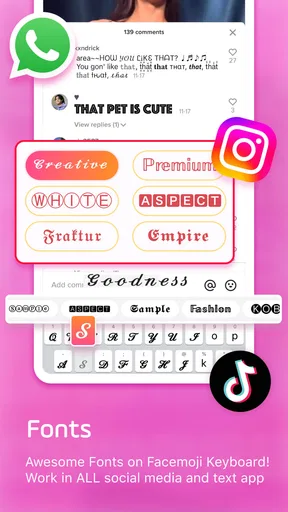
Yes, customization is a key feature of Facemoji AI Emoji Keyboard. Users can choose from a variety of themes, colors, and fonts to tailor the keyboard to their personal style. Additionally, you can create your own themes, offering an extra layer of personalization for your typing experience.
What are the system requirements for installing Facemoji AI Emoji Keyboard?
Facemoji AI Emoji Keyboard is compatible with both Android and iOS devices. For Android, it typically requires version 5.0 and up, while iOS devices need to be running iOS 10.0 or later. Ensure you have sufficient storage space for smooth installation and operation of the app.
